






Quick Links


Popular Searches



Close
Products

(This product is only available for South Region)
Looking for enterprise solutions?
Discover SeqriteLooking for enterprise solutions?
Discover SeqriteLooking for enterprise solutions?
Discover SeqriteLooking for enterprise solutions?
Discover SeqriteLooking for enterprise solutions?
Discover SeqriteLooking for enterprise solutions?
Discover SeqriteSupport
Resources
Downloads
Company





Quick Heal AntiFraud.AI
Detecting, alerting and preventing you from every kind of fraud.
Know More
Note: One key can be used on a single device at a time-Android, iOS, or Windows
Specially Curated Features
Helps you recognize and avoid real-world fraud
Assess your risk level with actionable steps to reduce exposure to fraud
Alerts you on detecting a fraud app.
Protects you from phishing link scams.
Notifies you if your sensitive data is leaked on the dark web
Secures all your online transactions from frauds.
Alerts you when a call may potentially lead to fraud


Helps you identify scams before you engage
Helps protect your close ones from banking frauds.
Alerts you on receiving a potentially fraudulent call.
Alerts you if your screen is being shared, while on a call.
Alerts you when your calls are being redirected.
Helps you avoid QR code scams.
Alerts you when an app uses Mic/Cam while the device is not in use.
Assess your risk level with actionable steps to reduce exposure to fraud
Protects you from phishing link scams.
Scan your device and internet connection during banking transactions for security
Blocks access to malicious websites from your browser

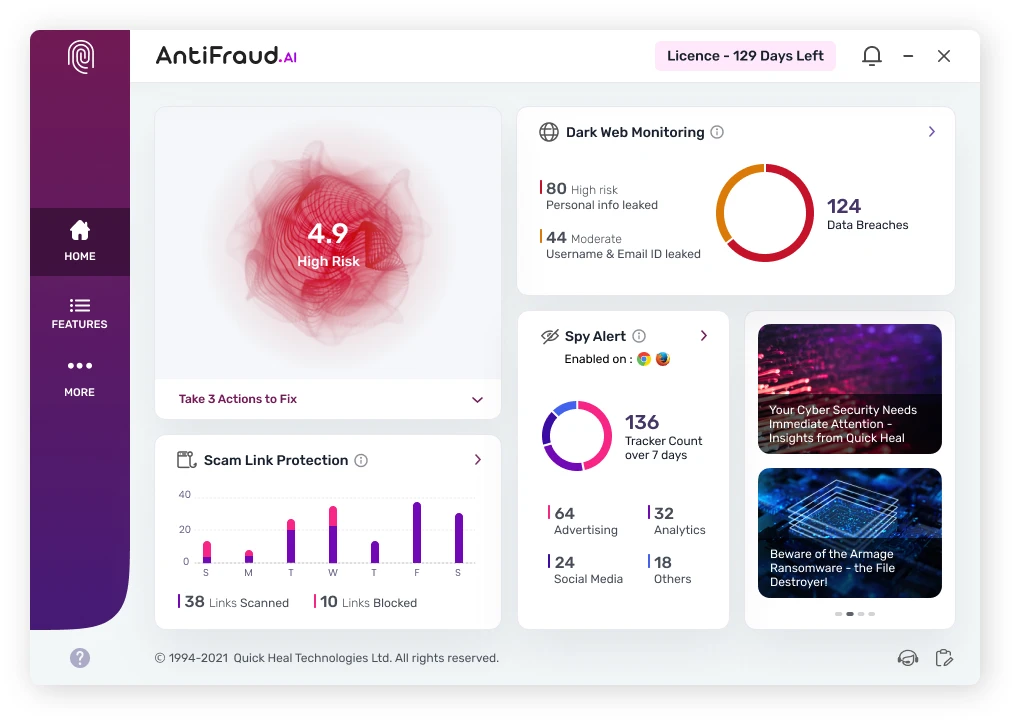
Notifies you if your sensitive data is leaked on the dark web.
Keep your privacy intact by blocking websites from tracking your online activities.
Scans for malicious software trying to access your device's webcam
Saves confidential data in an encrypted format to prevent unauthorized access
Assess your risk level with actionable steps to reduce exposure to fraud
Protects you from phishing link scams
Save your loved ones from any digital frauds.

Notifies you if your sensitive data is leaked on the dark web
Alerts you on receiving a potentially fraudulent call.
Offers you valuable insights into the latest cybersecurity trends.
It’s advanced AI backed technology focusses on detecting any potential fraudulent situations and alerting you in real time.
It checks incoming calls from unknown numbers to see if they might be scam/fraudulent and alerts you.


It checks certain parameters of the payment app and the state of your device to determine if you are safe to make an online payment. It alerts you if the device is compromised or unauthorized access is detected.

It notifies you if any application accesses your device's mic or camera while your device is not in use or locked.

It enables you to add a loved one, as your dependent. It alerts you immediately if your dependent receives a call that may result in potential fraud.

It keeps an eye on hidden and secret places on the internet and alerts you if your personal information, like your email, passwords, or credit card numbers, is being sold or shared by criminals.

It blocks all kinds of scam/phishing links usually through fake emails, messages or websites keeping you safe.

It proactively detects and alerts you about potentially harmful, fraudulent, or deceptive (hidden) apps on your device.


Sneha Katkar
Product Custodian, Quick Heal
Testimonials


Android
Step 2

Verify your details
and follow the instructions
Step 3

Select 'I have product key'
and Enter the product key
iOS
Step 2
Verify your details
and follow the instructions
Windows

9M+
Customers Who Believe In Us

30+
Years of Legacy Innovation

70+
Countries Covered Globally

9
Patents for Cybersecurity

#1
India's Largest
Malware Lab
What is AntiFraud.AI?

AntiFraud.AI is India’s first fraud prevention solution designed to keep users safe from frauds and scams. Leveraging advanced AI and machine learning (M/L) technology, it focuses on detecting potential fraudulent situations and alerting users in real-time. Given the dynamic nature of fraud, where methods constantly evolve, an active subscription to AntiFraud.AI ensures access to the latest features as they are added, continually adapting to the newest fraud tactics. This proactive approach empowers users to stay one step ahead of potential threats.
If I need any assistance on AntiFraud.AI, what do I do?
The Dashboard of AntiFraud.AI is Super intuitive in nature and has an inbuilt help available. However, for any further support, you may reach out to below:
How do I use the product key to activate the product?
Please follow these instructions to activate your product:
• For Android devices:
Step 1: Download the App from Google Play Store
Step 2: Verify your details and follow the instructions
Step 3: Select 'Enter Subscription Key' and enter the product key
• For iOS devices:
Step 1: Click here to fill up the form
Step 2: Verify your details and follow the instructions
Step 3: Download the app from App Store and follow the instructions in app
• For Windows devices:
Step 1: Visit Download Installer page.
Step 2: Enter the product key
Step 3: Follow the instructions on screen
If you have any questions or need further assistance, please visit here
How do I protect my elderly parents, kids with Fraud Protect Buddy feature?
With the Fraud Protect Buddy feature, you can designate your loved one—such as an elderly parent or a child—who may be at risk of fraud, as a ‘Dependent’ after purchasing a license for them. This feature will promptly notify you if they receive a call that has the potential to be fraudulent, helping you to take timely action and prevent payment fraud.
Both you and your buddy need to have an active subscription of AntiFraud.AI.
Does Quick Heal AntiFraud.AI need regular updates?
No, the desktop AntiFraud.AI does not include an antivirus engine, hence it does not need daily updates. To ensure you avail all the latest benefits of the app, your desktop AntiFraud.AI application would be upgraded periodically as frauds are dynamic in nature.
Why there are different features for different operating software?
The features of AntiFraud.AI cater to address the frauds happening on that platform ecosystem. The features are also subject to restriction imposed by the respective operating system that may be limiting. Despite these constraints, AntiFraud.AI continues to offer core functionalities across all three platforms Android, iOS and Windows.
Is AntiFraud.AI going to collect and store User Data as it secures multiple permissions in phone settings?
No, AntiFraud.AI does not collect or retain any personal identifiable information (PII). The app analyzes anonymized data to improve user experience. The solution seeks permissions to enable specific features to protect you from frauds. The software is designed with privacy as the first principle, ensuring that your critical data remains secure and is not stored or accessed by anyone, even Quick Heal.
Can I migrate my AntiFraud.AI license to a new device with a different OS?
Yes, AntiFraud.AI supports migration across various compatible platforms.
What type of devices (OS) does AntiFraud.AI work on?
AntiFraud.AI is compatible with versions of Android OS 10 and above; iOS 14.0 and above and Windows 8 or newer.
How does AntiFraud.AI protect me from new types of scams?
AntiFraud.AI employs advanced AI technology and leverages threat intelligence gathered from real-world fraud data. This enables AntiFraud.AI to continuously update and adapt, providing robust protection against emerging and evolving frauds.
Do I still need Antivirus or Mobile Security, if I have AntiFraud.AI subscription on my device?
Yes, you still need Antivirus for desktop and mobile to protect yourself from malware and you also need AntiFraud.AI to remain one step ahead of fraudsters.
Digital fraud typically involves deception and manipulation, whereas antivirus software is specifically designed to detect, prevent and remove malicious software such as viruses, worms, trojans, ransomware and spyware from devices.
This combination ensures comprehensive protection against cyber threats and financial fraud detection.
Will AntiFraud.AI come free with Quick Heal Antivirus?
No, AntiFraud.AI does not come free with Quick Heal Antivirus.
However, fraud prevention features for Windows are now inbuilt part of Quick Heal Total Security (TS) from version 25. Existing customers of Quick Heal Total Security on older versions are eligible for a free upgrade.
For how many devices can I use a single license of AntiFraud.AI?
A single license of AntiFraud.AI can be used on a single device. However, you can transfer the key to a different device at any point in time during the active subscription period.
Can AntiFraud.AI and Antivirus co-exist?
Yes, Quick Heal AntiFraud.AI can co-exist with any Antivirus. Both solutions can operate simultaneously on a device.
If I have Quick Heal Antivirus or any other Antivirus already Installed, do I still need AntiFraud.AI for fraud detection?
Yes. Antivirus software is designed to detect, prevent and remove malicious software (malware) from devices. This includes viruses, worms, trojans, ransomware, spyware etc.
The nature of Digital Fraud is different, which is often more about deception and manipulation. That is why Antivirus software might not be sufficient for protecting against various types of digital fraud.
Fraud detection software capabilities for the windows platform are now inbuilt as a part of our flagship product Quick Heal Total Security from version 25, existing customers of Quick Heal Total Security on older versions are eligible for a free upgrade.
For any other variant of Quick Heal Antivirus or any other Brand of Antivirus software, you will have to purchase AntiFraud.AI subscription separately.
Please complete your information below to login.