
08
Sep
Sep

Ongoing WhatsApp-Based Malware Campaign: Evolving Attack Techniques
-
QuickHeal / 4 weeks
- September 8, 2026
- 0

Introduction
Contributor: Umar Khan | Nikita Girisha Khatavkar | Madhav Vishwakarma
We are actively tracking a WhatsApp-Based Malware Campaign that spreads through WhatsApp and is currently targeting finance teams, executives, chartered accountants, and individual business users. This campaign has been running for some time; since August 2026, we have observed it evolve further, changing the type of file used to infect victims and adding new techniques to evade antivirus (AV) protection and gain persistent access to devices. This advisory summarizes what we have observed, the actions we have taken, and steps you can take to protect yourself and your organization.
What We’ve Observed
The malicious file spreads when an attacker uses a compromised WhatsApp account to send it to that person’s own contacts, often without the account owner realizing it. Since August 2026, we have tracked changes in this activity, with attackers switching the type of file used to trick people into infecting their own devices. It has appeared in three different disguises so far:
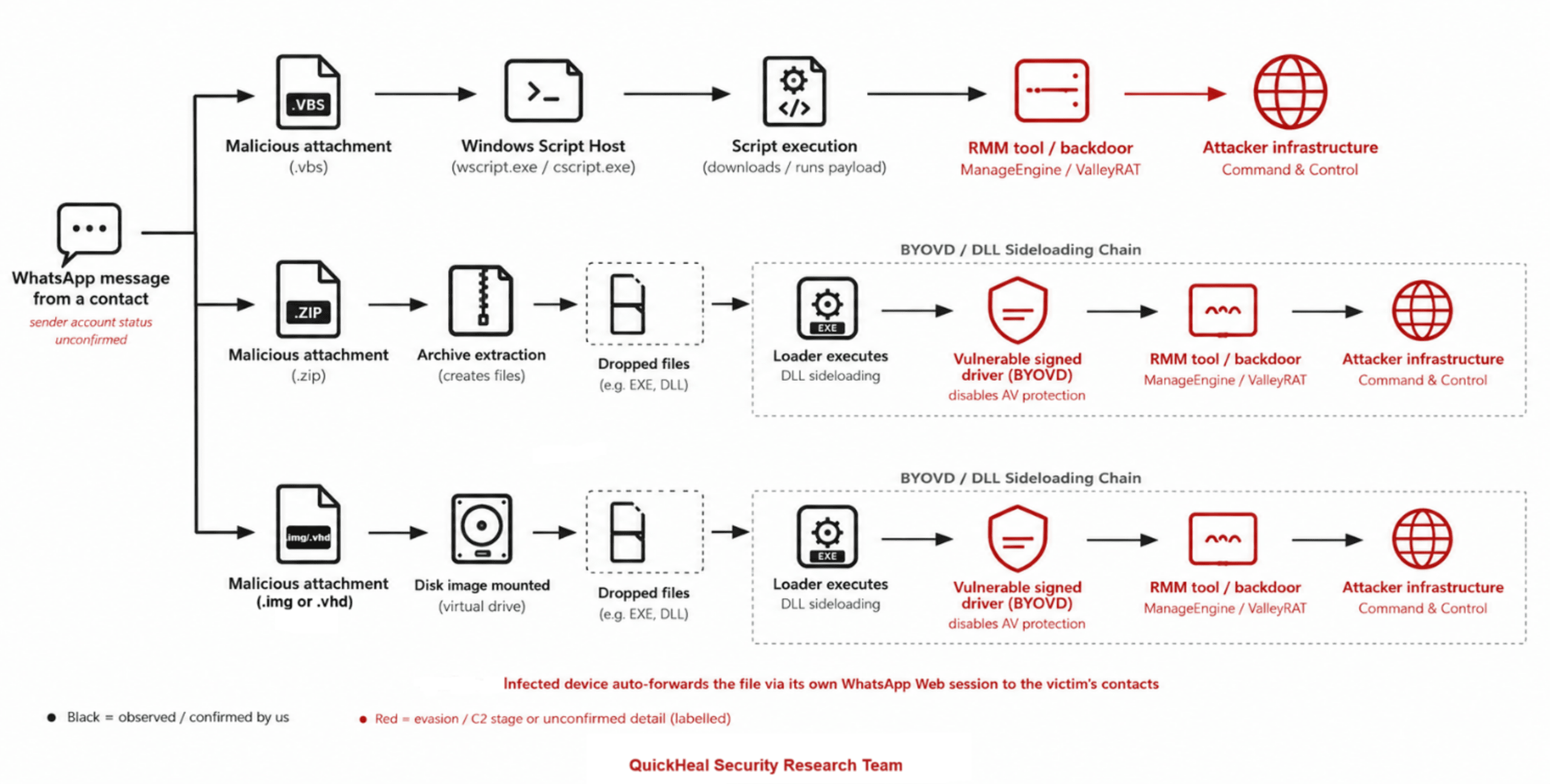
- Scenario 1 – VBS files: The campaign began by spreading malicious script files (.vbs) directly through WhatsApp.
- Scenario 2 – ZIP archives: The attackers moved to distributing ZIP archives containing an executable and a supporting file, using a technique known as “DLL sideloading” to run malicious code disguised as a legitimate program.
- Scenario 3 – Image (IMG) & VHD (Virtual Hard Disk) files (most recent): The campaign has now moved to using “.img” and “.vhd” files. Both types work the same way double-clicking one makes the computer treat it like a plugged-in disk, revealing a program and a hidden harmful file inside, in the same way as the ZIP stage above.
In its current form, once the malware runs, it installs a legitimate remote monitoring and management (RMM) tool ManageEngine Endpoint/Desktop Central or, in some cases, a backdoor Trojan, which the attackers use to maintain long-term, hands-on access to the infected device. The tool is configured with self-protection and password protection, which makes it difficult for victims or IT teams to remove.
Infection Chain Overview
The diagram below summarizes, at a high level, how a device is typically compromised in this campaign, from initial delivery through to attacker access.
Key Attack Components
- Delivery vector: The malicious file is sent from a compromised WhatsApp account to that account’s existing contacts, often using finance- or regulator-themed file names to build trust and urgency.
- Dropper files: Malicious .vbs scripts, ZIP archives, and — most recently — mountable .img and .vhd disk image files.
- Execution technique: DLL sideloading, where a legitimate-looking program is used to load a malicious supporting file.
- Defense evasion: The BYOVD technique, which installs legitimate but vulnerable signed drivers to disable or blind antivirus protection.
- Persistence mechanism: A legitimate remote monitoring and management (RMM) tool (ManageEngine Endpoint/Desktop Central) or a backdoor Trojan (such as ValleyRAT), configured with self- and password-protection to resist removal.
- Self-propagation: We have confirmed that once a device is infected, it can use its own active WhatsApp Web session to automatically forward the malicious file to the victim’s contacts, helping the campaign spread further.
Important: “.IMG” and “.VHD” files are NOT photos or documents
Many people assume a file ending in “.img” is an image or photo, similar to a .jpg or .png file it is not. Both .img and .vhd files are disk image formats, normally used to copy an entire disk or drive. When double-clicked, Windows mounts them as if a new drive had been plugged into the computer, and they can contain programs that run automatically. If you receive a file with a .img or .vhd extension, do not open it; treat it the same as you would an unknown program (.exe) file.
How Malware Spreads
The campaign relies on the trust people place in personal and business contacts, rather than sending messages from unknown numbers:
- Spreading through known, trusted contacts: Attackers are using compromised WhatsApp accounts to send the malicious file directly to that person’s existing contacts. Because the message appears to come from someone the recipient knows, they are far more likely to open it. This has also been independently confirmed by India’s national CERT (CERT-In advisory CICA-2026-3534, 25 June 2026), which reported the same pattern of compromised accounts being used to distribute this malware.
- Financial and business-themed file names: Attachments are disguised as routine corporate documents, such as “Financial Report,” “Account Statement,” “Outstanding Payment List,” or “Debt Confirmation.”
- Impersonation of regulators: Some files impersonate urgent communications from regulatory bodies, such as the Reserve Bank of India (RBI) or the Ministry of Corporate Affairs (MCA), to pressure recipients into opening them quickly.
Recent Evolution: Attempts to Disable Antivirus Protection
Our latest investigations show the campaign has added a further step before it installs the remote access tool. The attackers now attempt to disable or tamper with antivirus protection on the device using a technique known as “Bring Your Own Vulnerable Driver” (BYOVD).
In simple terms, this technique installs legitimate, digitally signed drivers that are known to contain security weaknesses. Because these drivers are legitimately signed, they are often trusted by the operating system, which allows attackers to abuse them to weaken or blind security software before continuing their attack.
Our Response
- Ongoing tracking: We are continuing to actively monitor this campaign and its evolution across all observed stages.
- Detection coverage: We have added multiple new detections and behavior-based protections across the different stages of the attack chain to identify and stop this activity. An update on this coverage was shared internally on 10 August 2026, and protections continue to be updated as the campaign evolves.
- Continuous monitoring: Our teams will continue to publish updates as new activity or techniques are identified.
Recommendations for Readers
We recommend the following precautions for all users and organizations:
- Never open unexpected files received on WhatsApp or any messaging platform even if they appear to come from a trusted contact, friend, or manager.
- Verify out-of-band: before opening any file, confirm with the sender through a separate channel, such as a phone call, rather than replying in the same chat.
- Be especially cautious with ZIP archives and disk image (.img and .vhd) files, and remember these are not photos or documents (see box above).
- Watch for high-pressure, finance-themed, or “regulator” file names such as account statements, payment notices, or compliance letters.
- Regularly check Settings > Linked Devices in WhatsApp and log out of any active web/desktop sessions you don’t recognize or no longer use.
- Keep antivirus and endpoint protection software up to date, and never disable security software, even temporarily.
- Report any unexpected prompts to install remote access or remote monitoring software particularly ManageEngine Endpoint/Desktop Central if you did not request it.
- If you suspect your device or WhatsApp account has been compromised, log out of all linked devices, disconnect the device from the network, alert QH team, and warn your contacts not to open any files sent from your number.