


27
Aug
Aug

SIR Voter ID Scam: How Cybercriminals Exploit Election Commission Notices to Steal Money
-
QuickHeal / 1 month
- August 27, 2026
- 0

Introduction
You may have recently heard about SIR Which stands for “Special Intensive Revision” For voter list verification. SIR is a real Election Commission process. But unfortunately, scammers have found a way to use it to trick people.
The Election Commission’s ongoing (SIR) of voter rolls has unfortunately spawned a new wave of cyber fraud. Scammers pose as election officials, claiming a voter’s SIR form was rejected or has errors, and urge victims to click links or pay a nominal fee (e.g. ₹5) to “fix” it. In reality, these messages lead to phishing sites or fake apps that harvest bank credentials, OTPs or install remote access malware. Senior citizens have been especially targeted, recent cases in Bengaluru, Pune and Hyderabad saw elderly victims lose ₹1–5 lakh each.
This post explains how the scam works, highlights real cases, lists common red flags, and provides clear prevention and recovery steps for all citizens especially seniors. Official ECI channels never charge fees or ask for banking details, and any unsolicited SIR call or link should be treated as a scam.
What is SIR and How Legitimate Election Processes Work
Before we understand how cyberfrauds are happening in the name of SIR let us first understand its actual meaning and Importance. The Special Intensive Revision (SIR) is a nationwide exercise by the Election Commission of India to verify and clean electoral rolls (which means: removing duplicates, deceased, and non citizens, while adding any missing voters).
It was announced in late 2025 and rolled out state by state through 2026. Critically, all SIR registration and corrections are free of charge. A genuine voter verification is done offline by enumerators or online via official portals (e.g. voters.eci.gov.in).
Real ECI communications never include sudden WhatsApp messages or calls demanding money or passwords.
Legitimate ECI Communication vs Scammers (Fake ECI)
Legitimate ECI Communication | Scam Indicators (Fake ECI) |
|---|---|
Channel: Official ECI websites, voter helpline app, or in person BLO visits. No random WhatsApp or SMS. | Channel: Unsolicited calls/SMS/WhatsApp messages claiming to be from ECI/BLO. Links often go to non ECI domains or apps. |
Fees: Free service. ECI never asks for any fee or payment. | Fees: Demands a “processing fee” (e.g. ₹5) or payment to update form. Which seems like a very small amount but its an invitation for a larger scam. |
Information Asked: Voters may confirm identity but never asked for banking details, OTP, PIN, CVV, or passwords. | Information Asked: Requests for bank login, card number/CVV, ATM PIN, OTPs, Aadhaar info, or “digital signature” to verify SIR. These are clear red flags. |
Apps & Links: ECI will never send a link over WhatsApp or ask you to download a third party APK file for voter ID issues. | Apps & Links: Scammers often send a WhatsApp link or a malware laced APK file to “fix” the SIR form. These download malicious software. |
Urgency/Threats: Legitimate notifications do not threaten immediate deletion. Formal letters or local officials will guide if any action is needed. | Urgency/Threats: Scams use high pressure tactics (claims of “ASDDO” list removal if you don’t act). Genuine agencies do not pressure you this way. |
Timeline of the Scam Emergence
The SIR voter roll drive began in late 2025, but reports of fraud started emerging by mid 2026. The timeline below highlights key events:
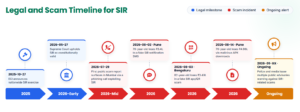
These incidents show the rapid spread of the scam. By August 2026, major news outlets and police cyber cells across Karnataka, Maharashtra, Telangana, etc., were issuing fraud alerts and advising caution.
How the Scam Works
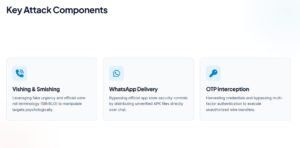
Cybercriminals exploit the trust and urgency around SIR by using social engineering. Typical steps include:
- Unsolicited Contact: The scam starts with a phone call or WhatsApp/SMS. The caller often claims to be an Election Commission/BLO official and says there is a discrepancy (e.g. father’s name mismatch) in your SIR form.
- Creating Urgency: Victims are told their voter ID could be deleted or their SIR application rejected unless they act immediately. This fear of being removed from the electoral roll (often labeled ASDDO: Absent, Shifted, Duplicate, Dead, Other) is a common trick. The supposed official then offers to “help” fix it.
- Sending a Fake Form/App: The caller sends a link or file via WhatsApp. Often this is a URL resembling an official ECI page or a malicious Android APK labeled as a voter-verification app. They may also send a QR code to scan.
- Asking for Payment: The portal or app prompts the victim to pay a small fee (e.g. ₹5) for processing, to seem legitimate. When victims attempt to pay, the fraud site intercepts the transaction.
- Harvesting Credentials: On the fake site/app, the victim is asked to enter sensitive information: netbanking ID/password, credit/debit card details, OTPs, CVV, or even ATM PIN. Believing it’s required for the “verification”, they comply.
- Remote Access/Account Takeover: Some scams install hidden malware or remote-access tools via the fake APK. This gives scammers full control over the phone. They can intercept OTPs or view banking apps.
- Fund Transfer: Using the stolen credentials or remote access, criminals quickly transfer money out of the victim’s account. Reported cases show unauthorized debits in the ₹1–5 lakh range happening within minutes.
This attack chain is summarized below:
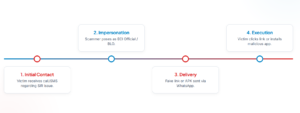
As LiveMint reports, the fraudulent app and QR code enabled scammers to gain access to the victim’s mobile and banking details, after which ₹3.49 lakh was siphoned off. This chain highlights why it’s crucial never to enter any banking details or OTPs on an unsolicited form.
Examples of Scam Messages and Red Flags
Scam messages follow common patterns. Below are typical examples (paraphrased) and their warning signs:
Scam Message (Example) | Red Flags / Explanation |
|---|---|
“Aapka SIR form reject ho gaya. Click this link to fix it” | Red Flags: Unsolicited link via WhatsApp/SMS; government never sends suchlinks. Language may be informal or contain errors. |
“Update your voter details under SIR immediately” | Red Flags: Comes with urgent tone. Official updates would never ask you to click a random link. |
“Download new voter slip (SIR) from this app” | Red Flags: Directs to install an unknown APK. ECI never asks you to download an app for voter ID. |
“Your SIR verification incomplete, pay ₹5 via netbanking” | Red Flags: Demand for fee (even ₹5) is fake. Genuine verification is free. |
Phishing website URL: http://eci-fix-sir.example.com (fake domain) | Red Flags: The URL is not eci.gov.in and looks suspicious. Shortened or unrecognized domains are typical in scams. Always verify official site addresses. |
Key warning signs include: receiving any unexpected message about SIR, requests for payment, prompts to download an app, or demands for OTP/banking info. ECI officials never initiate voter updates by calling citizens or sending WhatsApp links. If a message contains any of these red flags, it is almost certainly a fraud.
Case Studies and Victim Impact
Scam incidents have been well documented by police and the media. Recent case studies show:
- Bengaluru (Aug 2026): An 82 year old man received a call claiming a mismatch in his SIR form. He was asked to download a fake app and pay ₹5. When payment failed, the fraudsters sent a QR code. The app and QR code installed malware that gave scammers full access to his phone. They then made unauthorized transactions, stealing ₹3.49 lakh from his account. He later approached police and cybercrime helpline; a case was registered.
- Pune (Aug 2026): Several elderly victims were targeted:
- A man in his late 70s (Wadgaon Budruk) lost ₹4.98 lakh. He got a call and WhatsApp video link about an SIR mismatch, then downloaded three malicious APKs sent by the scammer. After an attempted ₹5 payment, three large withdrawals (₹1.5L, ₹1.99L, ₹1.49L) were made via the apps.
- Earlier (Aug 2), a 78 year old retiree lost ₹3.4 lakh. He received an SMS claiming his SIR form was rejected due to an error in his father’s name. The message included a link to a “form” that was actually remote access malware. He entered his ID and banking credentials, which were stolen. The victim noted he trusted the message because it bore “ECI” in the header.
- Around the same time, another retired engineer lost ₹4.43 lakh after being told his SIR application was rejected.
- Hyderabad (Early Aug 2026): Police reports (and local news) mention a 75 year old retired RBI employee who fell prey to a similar SIR fraud, losing over ₹3.5 lakh The method was identical: a call about voter verification followed by a link/app scam.
These examples illustrate common threads: victims are often seniors (60+), scammers use personalized details (e.g. name or father’s name) to build trust, and losses routinely exceed lakhs of rupees. In each case, victims acted in good faith and cooperated (downloading the app or following instructions), then realized too late that it was a trap.
Investigators warn that once money is transferred, it is extremely hard to recover. Victims have reported losses to banks and police, but funds often vanish quickly.
Prevention Checklist
To stay safe, follow these simple guidelines:
- Stay Calm and Skeptical: If anyone calls or messages about SIR or voter ID out of the blue, do not panic. Remember that the real SIR process is free and usually done by enumerators or through official websites.
- Never Share Sensitive Info: Do not give out your bank details, Aadhaar number, OTP, PIN, or passwords to callers, ECI officials will never ask for personal banking data or OTPs.
- Ignore Unofficial Links/Apps: Never click on links or download apps sent by unknown callers/texts. Official updates will not come via WhatsApp. Delete any suspicious messages.
- Verify Through Official Channels: If concerned, independently verify by visiting the official ECI portal (voters.eci.gov.in) or using the Voter Helpline App. You can also contact your local Booth Level Officer (BLO) directly.
- Ask Questions: If on the call, ask the caller for their official ID, department, and a number to call back. Genuine officers will not mind. A scammer usually cannot answer safely.
- Refuse and Hang Up: If anything feels off (payment request, app download, OTP request), politely refuse
- Emergency Steps if You Acted: If you already entered any information or payments:
Contact your bank immediately to block cards and change netbanking passwords.
Report the fraud: File a complaint on the National Cyber Crime Reporting Portal or call the cyber helpline at 1930/1933. Also inform your local police cyber cell.
Change Passwords and SIM: If you gave away your mobile OTP, consider contacting your telecom provider to suspend or reissue your SIM to prevent SIM-swap attacks.
Tell Family/Friends: Inform relatives and neighbors (especially other seniors) so they don’t fall victim.
Recovery Steps and Contacts
Victims should follow this action plan if they suspect fraud:
Action | Contact / Resource |
|---|---|
Block banking access: Call your bank’s fraud helpline (number on back of card or passbook) or visit the local branch immediately. | Example: SBI :1800-11-2211 |
Report to cyber authorities: Use the National Cyber Crime Portal (cybercrime.gov.in) to file an FIR. You can also dial 1930 (MHA cyber helpline). | Portal: cybercrime.gov.in |
Inform the Election Commission: Reach out to your local Electoral Registration Office or BLO to confirm your voter status and report the scam. | Find contact: eci.gov.in “Contact Us” or state CEO/EROs. |
Legal action: File an FIR with local police (cyber cell) including all screenshots and call records. | Your local police station or Cyber Police. |
Monitor financial accounts: Keep an eye on bank statements and credit reports. Notify credit bureaus if data was leaked. | CIBIL, Experian etc. (victim can use grievance channels). |
Always insist on official sources. As Pune Cyber Crime police advise, never trust any caller’s number or link instead confirm via known channels.
Official and Institutional Responses
Election and law enforcement authorities have responded swiftly. State CEOs and police have issued repeated fraud alerts warning voters that ECI/CEO will never ask for OTPs, payments or downloads. For example, Telangana’s CEO published advisories explicitly stating any SIR related request for OTP or money is fake. Police departments (Pune, Mumbai, etc.) have posted guidelines echoing the same advice.
Banks and regulators have also reminded customers of basic banking security (e.g. “No bank will ask for your OTP” alerts). The Reserve Bank’s “Do Not Disturb” (DND) registry can block telemarketing calls, and customers are urged to activate it. Telecom operators are under scrutiny for SIM swap frauds, and the government has pushed for stricter verification to prevent unauthorized porting.
Policy fixes suggested by experts include: strengthening data protection around electoral rolls, public education campaigns for seniors, and faster takedown of scam websites/domains. In the meantime, awareness is the key defense. Every unreported call helps scammers refine their tactics, so sharing information about these frauds is crucial.
Conclusion
The SIR verification scam is a stark reminder that cybercriminals will exploit any credible sounding government process to dupe citizens. By understanding that official voter registration processes are free and secure, recognizing the scam signs listed above, and following simple verification steps, seniors and all voters can protect themselves. In doubt, always pause and check with trusted sources (official ECI channels or local election offices) before taking any action. Stay vigilant, spread the word to family and friends, and report any suspicious activity promptly.
Stay safe and vote with confidence do not let scammers steal your hard earned savings or compromise your voter identity!
Sources
- https://www.livemint.com/news/india/sir-fraud-alert-lessons-from-bengaluru-mans-3-49-lakh-mistake-how-fake-eci-officials-may-scam-you-how-to-be-safe-11785731906582.html
- https://indianexpress.com/article/cities/pune/sir-scam-pune-man-loses-rs-4-98-lakh-fake-election-commission-officer-10832757/
- https://timesofindia.indiatimes.com/city/mumbai/retired-mumbai-college-principal-first-victim-of-sir-scam-with-apk-file-loses-rs-17-lakh/amp_articleshow/133267124.cms
- https://www.thequint.com/news/webqoof/sir-form-mistake-details-mismatch-whatsapp-app-form-scam
- https://www.indiatoday.in/india/story/telangana-cyber-security-bureau-fake-sir-messages-election-commission-voter-fraud-2970813-2026-08-13