



18
Nov
Nov

Someone Made a Fake Instagram Page of My Business: How to Find, Report and Remove It
- QuickHeal / 7 seconds
- November 18, 2026
- 0

Your business has an Instagram page where customers discover your products, check updates, and contact your team. But one day, a customer sends you a screenshot of another account using your business name, logo, and photographs.
The account looks familiar. It may even have a similar username and bio. However, it isn’t managed by your business.
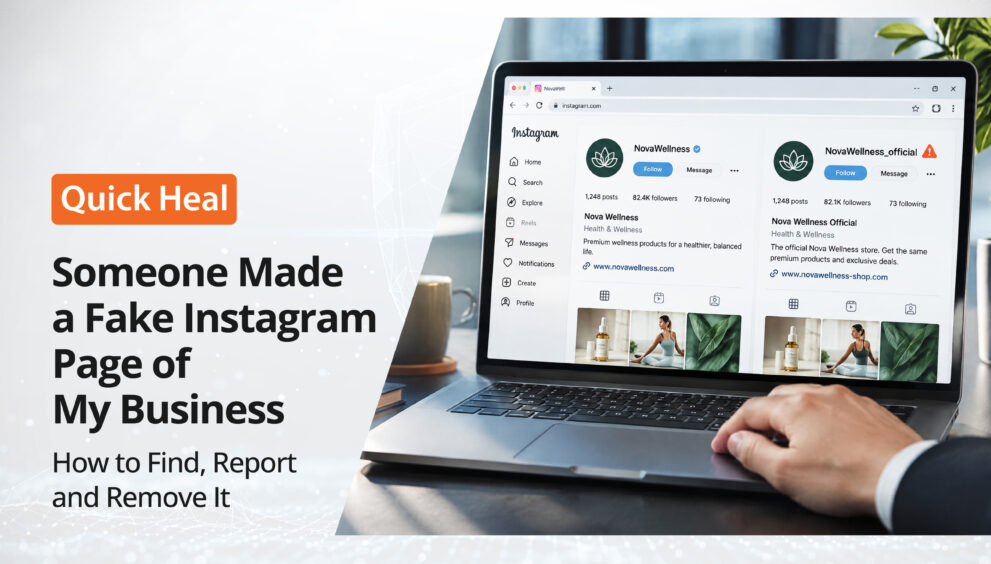
This is a common form of brand impersonation. Someone creates a fake Instagram page using your business identity, potentially misleading customers, misusing your brand reputation, or making people believe they are interacting with your official account.
If you’re wondering, “Someone made a fake Instagram page of my business. What should I do?”, the first step is to identify the account and understand how it is using your brand.
Here’s how you can find suspicious accounts, report Instagram impersonation, and use Quick Heal Spotr to support your response.
Why Would Someone Create a Fake Instagram Page of Your Business?
A fake business account may look like a duplicate of your official Instagram profile. The person behind it may copy your business name, profile picture, logo, posts, or other identifying details to make the account appear genuine.
There can be different reasons behind such impersonation:
- Misleading customers: The fake account may pretend to offer your products or services and communicate with people as if it represents your business.
- Misusing your brand identity: Someone may use your logo, business photographs, and brand information without permission.
- Promoting fake offers: The account may advertise discounts, giveaways, or deals that your business has not announced.
- Collecting customer information: Impersonators may approach followers and ask for personal or payment-related information.
- Damaging brand credibility: If customers have a negative experience with the fake account, they may mistakenly associate it with your actual business.
Even if the fake page has only a few followers, it is worth investigating. An impersonating account can create confusion as soon as it starts interacting with your customers.
How to Find Someone Using Your Business Name on Instagram
Fake Instagram pages are not always exact copies of the original account. Some use slightly different usernames, modified logos, or only a few copied posts.
Instead of looking only for an identical profile, review the following details when checking for possible impersonation.
1. Search for Your Business Name and Variations
Start by searching Instagram for your exact business name. Then try common variations, such as:
- Your business name without spaces.
- Your business name with words like official, store, support, or India.
- Shortened versions of your brand name.
- Usernames with additional numbers, underscores, or dots.
This can help you spot accounts that use a name similar to yours.
2. Compare Profile Details
Once you find a suspicious account, compare it with your official business profile.
Look at its profile photograph, bio, username, website link, contact information, and posts. Check whether it uses your business logo, photographs, product images, or descriptions.
A close resemblance does not automatically establish impersonation, but it can be a reason to investigate further.
3. Check How the Account Interacts With People
Pay attention to how the suspicious profile communicates with followers and customers.
Does it claim to represent your business? Does it respond to customer queries, announce offers, or share contact details that your company does not recognise?
If customers have received messages from the account, ask them to share screenshots or the profile link. This can help your team understand how the account is using your brand identity.
4. Verify Whether the Account Is Official
Compare the suspicious profile with the links and social media handles listed on your official website and other verified communication channels.
If the account is not listed or recognised by your business, check with the person or team responsible for managing your social media accounts before treating it as an impersonation case.
What to Do When You Find a Fake Business Account on Instagram
Once you have identified a suspected fake account, take a structured approach instead of immediately engaging with the person behind it.
Step 1: Save the Account Details
Before reporting the account, collect the information you may need for reference.
Keep a record of:
- The fake account’s username and profile URL.
- Screenshots of its profile, bio, and posts.
- Any messages sent to your customers.
- Examples of your business name, logo, or photographs being used.
- Relevant customer complaints or reports.
This information can help you explain why you believe the account is impersonating your business.
Step 2: Report the Account on Instagram
Instagram provides reporting options for accounts that may be impersonating a person or business.
Open the suspicious profile, access its reporting option, and select the category that best describes the issue. Follow the instructions provided by Instagram and submit the information requested.
If the account is impersonating your business, explain that it is using your company’s identity without authorisation. Provide supporting details wherever the platform allows you to do so.
You can also ask customers who have encountered the fake page to report it independently.
Step 3: Alert Your Customers and Followers
Reporting the fake account is important, but customers may continue interacting with it until they know it is not genuine.
Publish a warning through your official Instagram account. Mention the suspicious username and clarify that it is not associated with your business.
You can also:
- Share a story warning followers about the fake account.
- Pin a clarification post if the issue is affecting many customers.
- Ask customers not to respond to suspicious messages or share sensitive information.
- Direct people to your official website and social media handles.
Keep the message simple and clear so that customers can easily distinguish your genuine account from the impersonator.
Step 4: Follow Up on the Report
After submitting a report, keep checking for updates from Instagram. If the account remains active, review the available reporting options and provide any additional information requested by the platform.
Avoid assuming that submitting a report means the account will automatically be removed. The platform reviews reports and determines what action is appropriate.
How Quick Heal Spotr Helps You Find and Report Fake Instagram Profiles
Searching for fake accounts manually can become difficult when your business has multiple social media profiles or a growing customer base.
Quick Heal Spotr for Small Businesses helps you monitor your digital presence and look out for potential identity misuse, including profiles that use your brand name, photographs, or details to copy your business.
Here are the features that can support your response to suspected Instagram impersonation.
1. Fake Profiles: Look for Accounts Copying Your Business
Spotr’s Fake Profiles feature looks for profiles that may damage your reputation by using your brand name, photographs, or other details to copy your business.
You can connect the social account you want to protect by selecting the platform or entering your profile URL.
This helps you keep an eye on potential fake profiles that may be misusing your business identity.
2. Scan for Fake Profile: Check the Match Percentage
Have you found an Instagram account that looks suspicious but aren’t sure how closely it matches your official profile?
Spotr’s Scan for Fake Profile feature lets you enter a profile handle and view a match percentage indicating how likely the account is to be a duplicate.
This gives you an additional reference when reviewing a suspected impersonating profile. You can use the result alongside the account’s details and other information available to your business.
3. Report Account: Report Suspected Impersonation
Once you identify a suspected fake profile, Spotr’s Report Account feature lets you report it to the platform where it appears.
This helps you take action against suspected profile impersonation through your monitoring and response workflow.
4. Let Us Handle It: Get Help With Supported Removal Requests
Managing removal requests and following up on them can take time, especially when you’re also handling everyday business activities.
With Spotr’s Let Us Handle It feature, you can use credits to let Spotr file a removal request and manage follow-ups.
Where a removal request is supported, this can help reduce the effort involved in managing the process. Spotr also provides request tracking so you can check the status and timeline of submitted requests.
How to Reduce the Risk of Instagram Business Impersonation
You cannot completely prevent someone from copying publicly available business information. However, a few practical steps can help customers recognise your genuine account and make suspicious profiles easier to identify.
- Keep your official details consistent: Use the same business name, logo, website, and contact information across your official digital channels.
- Link your Instagram account from your website: This gives customers a reliable way to find your genuine profile.
- Publish clear communication guidelines: Tell customers which accounts and contact channels your business uses.
- Warn customers about suspicious offers: Clarify that offers, payment requests, and announcements should be verified through your official channels.
These steps can help customers verify who they are interacting with and reduce confusion when fake accounts appear.
Keep Your Business Identity Protected on Instagram
A fake Instagram page using your business name is more than just an unwanted social media account. It can confuse customers, misuse your brand identity, and affect the trust you have built with your audience.
If you discover a suspicious profile, verify its details, report it through Instagram, and inform your customers through your official channels.
You can also use Quick Heal Spotr to look for potential fake profiles, check the match percentage of a suspicious account, and report suspected impersonation to the relevant platform.
Your business identity is part of your reputation. Keep an eye on it with Quick Heal Spotr.