


15
Oct
Oct

The Frozen-Screen UPI Scam
- QuickHeal / 3 minutes
- October 15, 2026
- 0

Introduction
In recent days we have found something on trend, you tap an ad or a link, and your phone suddenly freezes. The screen goes blank, or an error pops up. A second later, a call comes in from someone who says they are from your bank. They sound calm and helpful. They tell you there is a problem and they can fix it you just need to install one small app (the classic social engineering) Stop right there. That whole sequence is the scam. today we will discuss about this scam in detail and talk about the preventive mesasures too.
Well the freeze isn’t a real breakdown. It is a trick to scare you, so you stop thinking clearly and start following orders. This guide explains, what is really going on, how the money actually leaves an account, and exactly what to do if it happens to you.
First, the good news: a frozen screen cannot empty your account
This is the most important thing to understand, because a scary rumour is doing the rounds that a frozen screen drains your account “by itself.” That is not true.
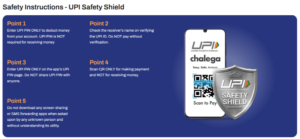
NPCI, the body that runs UPI, has made the rule clear: money only leaves your account when you choose “Pay” and enter your UPI PIN for that specific payment. Simply checking your balance, or a screen that freezes on its own, cannot move a single rupee. And to receive money, you never need to do anything no PIN, no scanning, no approval.
Remember this one line
You enter your UPI PIN only to send money. If anyone asks for your PIN or an OTP to “receive” a refund, “verify” your account, or “fix” a problem it is a scam. Every time.
So if the freeze itself can’t take your money, how do people lose it? Two ways, and both need you to act. either you are tricked into approving a payment yourself or you install an app that quietly does the tapping for you. Let’s walk through it.
How the scam really works, step by step
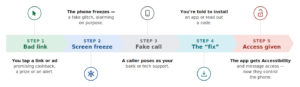
- You click a bad link or ad. It might promise cashback, a prize, an urgent news video, or a problem with your account.
- The screen freezes. This is a fake error or a stuck overlay. It looks alarming on purpose.
- A support call arrives. Someone says they are from your bank, or from tech support. They may even know your name or a small detail, to sound real.
- They give you a fix. Install this app, they say or read out the code you just got by SMS, or let me connect to your screen to sort it out.
- You grant access. The app asks for permissions usually “Accessibility,” plus access to your messages and notifications.
- The money leaves. Now the scammer can read the OTPs that arrive on your phone, see what’s on your screen, and even tap buttons for you. Or they simply talk you into approving a payment you think is a “refund.”
- You find out too late. Often you only notice when the app disappears or the call ends and the balance is gone.
Because you either approved the payment or your own phone was used to do it, the bank’s systems see a normal, correctly approved transaction. That is what makes this kind of fraud so hard to reverse.
Why the “freeze” is just a distraction
Security experts who studied this scam say the freeze is almost beside the point. Harish Kumar, the CEO of Quick Heal Technologies, told NDTV that the frozen screen is often “not the real event, but the distraction.” It buys the scammer a few panicked seconds to get you talking and following instructions.
Other experts speaking to NDTV made the same point in a different way, the criminals are not breaking UPI. UPI’s own security the encryption, the PIN, the two step approval is not being cracked. Instead, they go after the weakest link, which is a worried human holding the phone. They target your device, your codes, and your trust, not the bank’s maths.
That distinction matters for a simple reason: if the technology isn’t broken, then your own caution is the real defence. No app update can protect someone who installs a stranger’s software and reads out their OTP.
The tricks they use to get your money
Once you are on the hook, scammers reach for a handful of well known tricks. Knowing them by name makes them easy to spot.
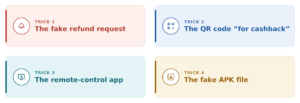
The fake “refund” or collect request.
You get a payment request that looks like money coming in. But approving it and entering your PIN actually sends money out. Rule: reading “request” or a person’s name on that screen means you are about to pay, not receive.
The QR code “for cashback.”
Someone sends a QR code and says scan it to get your refund. Scanning a QR code is always to pay money, never to collect it. Decline every “refund QR.”
The remote control app.
You are asked to install a screen sharing tool like AnyDesk or TeamViewer, Screenconnect etc. so they can “help.” Now they watch your screen and your OTPs live. No real bank will ever ask for this.
The fake APK.
A file sent over WhatsApp or a link, dressed up as a reward, verification or service app. Once installed and given accessibility permission, it can read your screen and tap for you. Only ever install apps from the official Play Store or App Store.
How big is this problem, really?
Well Big, and growing but the numbers also show why panic helps the scammers. According to figures the government placed before Parliament, UPI fraud losses were about ₹1,087 crore in 2023 -24 and around ₹981 crore in 2024–25, spread across more than 12 lakh cases each year. In the current year, roughly ₹805 crore had already been lost by November 2025.
A large consumer survey by LocalCircles, reported by Business Standard, found that one in five families with a UPI user had faced fraud at least once in three years and that about half of the victims never reported it. That silence is a gift to criminals. Reporting fast is one of the few things that genuinely helps, as you’ll see below.
The pattern behind most of it
Almost none of this is “hacking” in the movie sense. Investigators and the RBI both describe the same story again and again: the fraud happens at the human layer. Someone is rushed, scared or tempted into approving a payment or handing over a code.
Slow down, and most of these attacks simply fall apart.
Warning signs if you spot even one, stop
- A call or message you didn’t ask for about your UPI or a “problem” with your phone. Real banks rarely cold call to fix things.
- A freeze followed by an easy fix that involves a website, an app, or a code. A genuine glitch is fixed by restarting nothing more.
- Any request for your PIN or OTP to receive money. This can only ever be a trick.
- Pressure and a deadline: Your account locks in 5 minutes, police will act tonight. Urgency is the scammer’s main tool.
- Being told to install something from outside the official app store, or to allow “screen sharing.”
- A helpline number you found on Google. Fraudsters buy ads with fake “bank support” numbers. Use only the number printed inside your bank’s app.
The moment your screen freezes: what to do
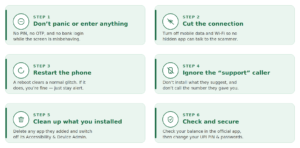
- Don’t panic, and don’t enter anything. No PIN, no OTP, no bank login while the screen is misbehaving.
- Cut the connection. Turn off mobile data and Wi-Fi. This stops any hidden app from talking to the scammer.
- Restart the phone. A normal glitch clears with a reboot. If it does, you are fine stay alert.
- Ignore the “support” caller. Do not install anything they suggest. Do not call the number they gave you.
- Clean up if you installed anything. Delete any app the caller made you add, and switch off its Accessibility and Device Admin permissions in Settings.
- Check and secure. Look at your bank balance in the official app. Change your UPI PIN and banking passwords once the phone is clean.
If money is already gone move fast
Speed is everything here. Stolen money is often moved through several accounts within minutes, so the first hour matters most.
- Call 1930 straight away. This is the national cyber-fraud helpline run by the Ministry of Home Affairs. The sooner you call, the better the chance the money can be frozen in transit.
- Report online too. File a complaint at cybercrime.gov.in with the time, the scammer’s number, transaction IDs and screenshots.
- Tell your bank now. Use the official helpline in your app to report the unauthorised transaction and ask them to block your UPI or card.
- File a police FIR. Visit your local cyber police station with all the evidence.
- Keep every scrap of proof. Do not delete the chats, SMS or call records they help investigators trace the money.
Can you get your money back?
Well In my Personal Opinion its tough, Sometimes and reporting quickly is what tips the odds. Under the RBI’s 2017 customer protection rules, if an unauthorised transaction is a third party fraud and you were not careless, and you report it within three working days of the bank’s alert, your liability is meant to be zero and the bank should refund you. Report within four to seven days and your loss is capped (roughly ₹5,000 to ₹25,000, depending on the account). After that, it depends on the bank’s own policy.
There is an honest catch, though. Banks can argue you were “negligent” which ofcourse is mostly done in Indian banks, if you willingly shared your PIN or OTP, or tapped “approve” yourself. In these scams, that is often exactly what happened which is why some victims struggle to get a full refund, and why prevention beats cure. If your bank drags its feet beyond 10 working days, you can escalate to the RBI Banking Ombudsman.
If you see this message, do this
A quick reference for the most common scam lines and the safe response to each.
| What the scammer says | What you should do |
|---|---|
| “Your account is blocked. Call 1800-XXX-YYY.” | Don’t call back. Banks don’t send random blocking messages. Use the number in your app. |
| “Scan this QR to get your cashback/refund.” | Never scan it. A QR scan pays money out it never brings money in. |
| “Enter the OTP to receive your funds.” | It’s a trap. An OTP only approves money going out. Never share it. |
| “Install this app so I can fix your phone.” | Refuse. Delete anything you’ve added. No real support needs a random APK. |
| “Let me connect to your screen to help.” | Say no and hang up. Screen sharing hands them full control. |
| “I’m from [Bank] support, there’s an error.” | Hang up and call the bank yourself using the app’s official number. |
Five rules that keep you safe
- Screen froze? Turn off the internet and restart. Don’t follow a caller’s “fix.”
- Never share your UPI PIN, OTP, CVV or passwords with anyone, for any reason.
- Never install an app or APK sent by a caller or a link. Official stores only.
- Always check the name and amount on screen before you enter your PIN.
- Report fast: call 1930 and your bank the moment something feels wrong.
The safest payment is the one you fully understand before you approve it. When a “technical emergency” lands out of nowhere, that feeling of rush is the warning itself. Pause, breathe, and check with your bank on your own terms. Calm is what beats this scam.